
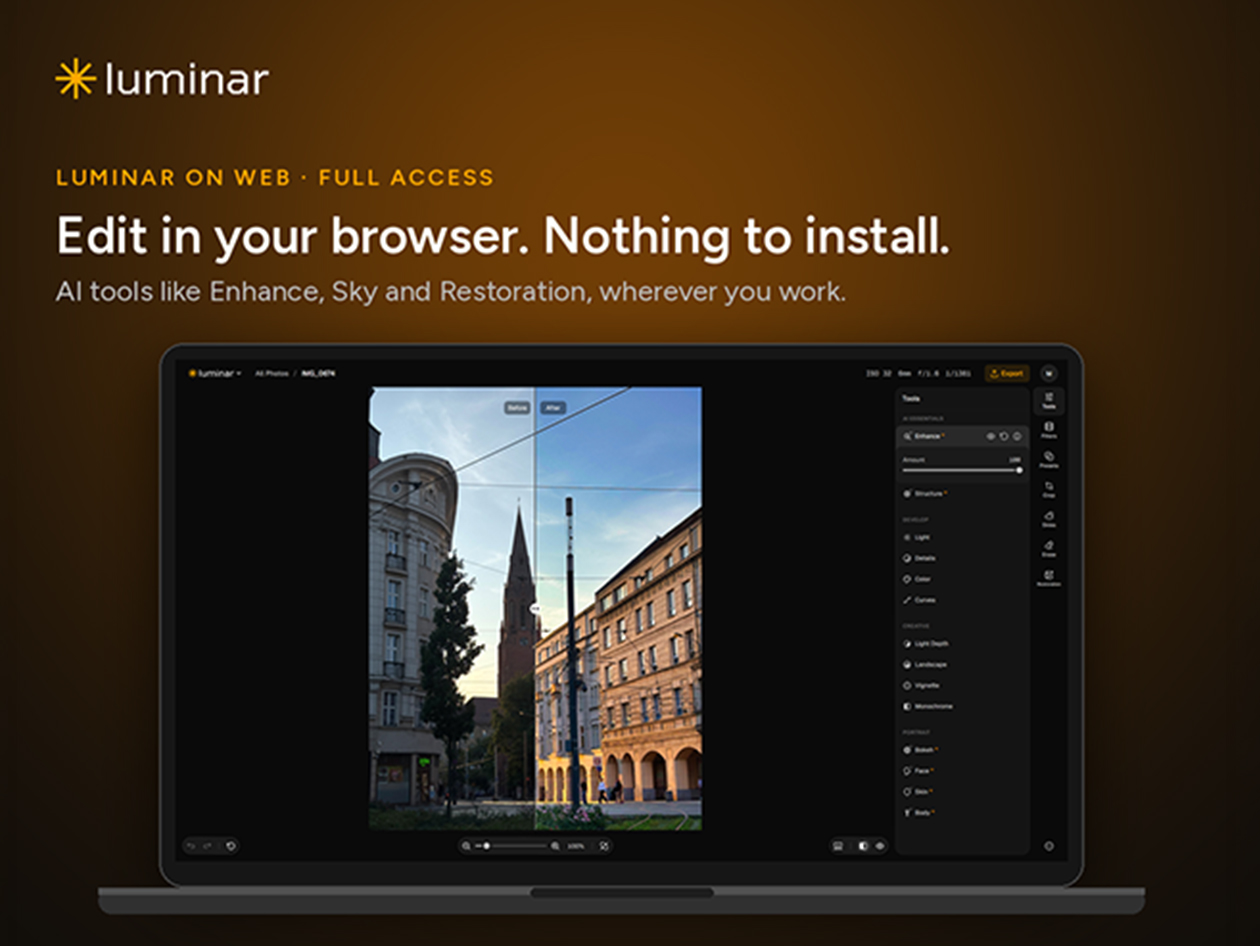
KEY FEATURES
Unlimited AI Edits & Full RAW Support, No Install
Get lifetime access to Luminar on Web Full Access for one price, with no subscription. You get Skylum’s complete AI editing toolkit right in your desktop browser, and a lifetime Luminar for Mobile license is included. You can use Enhance AI, Sky AI, Erase, Light Depth and more with unlimited AI edits and no credit limits.
Luminar on Web runs in Chrome, Edge, Firefox or Safari on Windows, macOS or Linux, with nothing to download or install. Sign in with your Skylum account on as many devices as you like. Cloud sync carries your work between web and mobile.
Skylum’s free Web Only plan is limited to basic tools, 100MB of cloud storage and standard-quality exports at 1280px. Full Access adds all nine core AI tools, the full presets and filters library, and cross-device editing between web and mobile.
The web editor needs an internet connection and a desktop browser, so on your phone or tablet you’ll use the included Luminar for Mobile app. Luminar Desktop and Skylum’s generative AI tools aren’t part of this plan, so you’ll need a separate Desktop license to move your edits there.
AI Editing Tools, Presets & Unlimited AI Edits
Enhance AI: Improve color, light and detail in one step.
Sky AI: Replace dull or overcast skies.
Structure AI: Bring out texture and detail without affecting faces.
Bokeh AI: Add a realistic background blur.
Face AI: Refine facial features in portraits.
Skin AI: Retouch skin naturally.
Body AI: Adjust body shape in portraits.
Erase: Remove unwanted objects from your photos.
Light Depth: Adjust light based on the depth of the scene.
Presets & Filters: Full access to the presets and filters library.
Unlimited AI Edits: No credit system or hidden limits on AI use.
Browser Access, Cloud Sync & Cross-Device Editing
No Installation: Runs directly in your desktop browser.
Full RAW Support: Edit RAW files in the browser.
Luminar for Mobile Included: A lifetime mobile license comes with your purchase.
Cloud Storage: Access your files across Web and Mobile.
Cross-Device Editing: Move between Web and Mobile while you work.
Unlimited Devices: Sign in with one Skylum account on any number of devices.
PRODUCT SPECS
System Requirements
Windows: Chrome, Edge or Firefox.
macOS: Safari or Chrome.
Linux: Runs in a browser.
Screen: Browser viewport at least 760 pixels wide.
Internet: Required. A stable connection is recommended for uploading, editing and exporting.
Installation: None. It runs directly in your browser.
Important Details
Length of access: lifetime
Available for NEW users only
Redemption deadline: redeem your code within 30 days of purchase
Access Options: Web (desktop browser)
Max number of device(s): Unlimited
Updates included
Have questions on how digital purchases work? Learn more here
Learn more about our Lifetime deals here!
KEY FEATURES
Practice Along With 10 RAW Files & a Full Edit Session
Learn a complete, practical photo editing workflow in Luminar for Mobile from photographer and filmmaker Nikolaj Green, in six video lessons that run about 50 minutes in total. You’ll start with setting up the app and importing photos and finish by exporting at the best quality for any format.
The lessons follow the order you’d actually edit in. You’ll build a foundation with Light, Contrast and Curves, develop your style with Color, Saturation, Landscape and Vignette, and speed things up with AI tools like Structure, Enhance and Light Depth. Styles and Presets show you how to get quick, consistent results.
Free tutorials can teach individual tools, but this course gives you one structured workflow with 10 RAW practice files you edit along the way. A full start-to-finish session explains the reasoning behind every adjustment, including how to rescue a photo that wasn’t shot perfectly.
The course streams online with downloadable materials, so you can watch in any modern web browser. To follow along, you’ll need Luminar for Mobile installed and activated on your phone or tablet, because the app isn’t included with the course.
6 Lessons Covering Your Full Mobile Editing Workflow
Introduction: An overview of the course and what you’ll learn.
Lesson 1, Setting Up the App & Importing Photos: Set up Luminar for Mobile and organize your photos.
Lesson 2, Basic Adjustments: Build a strong foundation with Light, Contrast and Curves.
Lesson 3, Look & Style: Develop your own style with Color, Saturation, Landscape and Vignette.
Lesson 4, Edit Faster With Luminar: Speed up your work with Structure, Enhance and Light Depth, plus Styles and Presets.
Lesson 5, Start-to-Finish Editing Session: See the reasoning behind every adjustment, including how to rescue an imperfect shot.
Lesson 6, Exporting: Export your images at the best quality for any format.
Hands-On Practice Files & Course Format
10 RAW Practice Files: Edit along with the instructor throughout the course.
Full Editing Session: A complete start-to-finish edit is included.
Instructor: Nikolaj Green, photographer and filmmaker.
Runtime: About 50 minutes total.
Format: Streams online, with downloadable materials.
PRODUCT SPECS
System Requirements
Internet: Required to stream the course.
Browser: Any modern web browser.
App Required: Luminar for Mobile must be installed and activated to follow the lessons (sold separately).
App Compatibility: iPhone with iOS 17 or later. iPad with iPadOS 17 or later. Android 11 or higher with 4GB+ RAM. ChromeOS through Android Runtime.
Important Details
Length of access: lifetime
Available for NEW users only
Redemption deadline: redeem your code within 30 days of purchase
Access Options: Web (desktop browser)
Max number of device(s): Unlimited
Updates included
Have questions on how digital purchases work? Learn more here
Learn more about our Lifetime deals here!
KEY FEATURES
Techniques, Composition & Lighting for Small Subjects
Learn to take striking macro photos with Macrophotography: A World in Detail, an 86-page e-book from Team Skylum that shows you how to find the hidden beauty in small subjects. You’ll learn to turn leaf textures, insect-wing patterns and everyday objects into detailed close-up images.
Each chapter covers the techniques, compositions and lighting that make macro shots work, with practical tips, visual examples and insights you can apply on your next shoot. The guide encourages you to slow down, look closer and find creative detail in subjects you’d usually pass by.
The e-book is a PDF you download, so you can read it on a computer, tablet or smartphone. It’s a standalone photography guide, and no Skylum software or extra purchase is needed to use it.
Macro Techniques, Composition & Lighting
Macro Techniques: Methods for capturing small subjects up close.
Composition: How to frame close-up subjects for impact.
Lighting: How to light small subjects to reveal hidden detail.
Practical Tips: Advice you can use on your next shoot.
Visual Examples: Close-up images that show each method in practice.
Creative Insights: Ideas for finding detail in everyday subjects, from leaf textures to insect-wing patterns.
PRODUCT SPECS
System Requirements
Compatible Devices: Any device that can open PDF files, including computers, tablets and smartphones.
Format: PDF, delivered as a digital download.
Important Details
Length of access: lifetime
Available for NEW users only
Redemption deadline: redeem your code within 30 days of purchase
Access Options: Web (desktop browser)
Max number of device(s): Unlimited
Updates included
Have questions on how digital purchases work? Learn more here
Learn more about our Lifetime deals here!
KEY FEATURES
One-Tap Enhance AI, Sky Replacement & RAW Editing
Get a lifetime Luminar for Mobile license and edit photos on your phone or tablet with Skylum’s AI tools, with no subscription. You can improve any shot with one-tap Enhance AI, replace dull skies with Sky AI and retouch portraits naturally with Skin AI, all in a few taps.
The app runs on iPhone and iPad with iOS/iPadOS 17 or later, Android 11 or higher, and ChromeOS through Android Runtime. Full RAW support, Auto Masking and Portrait Bokeh give you pro-level control on the go. Cloud Sync keeps your work moving between devices.
Your phone’s built-in editor handles crops and basic filters. Luminar for Mobile adds AI sky replacement, natural skin retouching, background blur, cinematic Film Looks and RAW editing. Curves, Structure, Relight AI and B&W tools let you fine-tune every detail.
One-Tap AI Edits & Natural Portrait Retouching
One-Tap Enhance AI: Improve any photo in a single tap, so you get noticeably better results without adjusting individual sliders.
Sky AI: Replace dull or overcast skies to give landscapes and travel shots more color and atmosphere.
Skin AI: Retouch skin naturally in portraits, so your subjects look polished without an overprocessed, artificial finish.
Portrait Bokeh: Add a soft background blur that keeps your subject sharp and in focus, like a professional camera does.
Relight AI: Adjust the lighting in your photos to brighten subjects and balance scenes that were shot in difficult light.
Auto Masking: Select objects automatically so you can edit specific parts of a photo without tracing them by hand.
Film Looks: Apply cinematic filters that add rich color and mood, giving your photos a distinctive film-inspired style.
Pro Controls, RAW Support & Cross-Device Sync
Structure: Bring out texture and fine detail to make architecture, landscapes and close-ups look crisper and more defined.
Curves: Fine-tune tone and contrast precisely, giving you the same level of control found in desktop photo editors.
B&W: Convert your photos to black and white with dedicated tools for creating striking monochrome images.
Develop Tools: Make core exposure and color adjustments to build a strong foundation before applying creative edits.
RAW File Support: Edit RAW images directly on your phone or tablet to keep more detail and flexibility than standard JPEGs.
Cloud Sync: Keep your edits in sync between Mobile and Desktop, so you can start on your phone and finish on a larger screen (Desktop sold separately).
Lifetime License: Pay once and keep Luminar for Mobile with no subscription or recurring fees.
PRODUCT SPECS
System Requirements
iPhone: iOS 17 or later. 4GB+ RAM recommended. 6–8GB RAM for best performance with high-resolution images.
iPad: iPadOS 17 or later.
Android: Android 11 or higher, 4GB RAM or more.
ChromeOS: Supported through Android Runtime.
Important Details
Length of access: lifetime
Available for NEW users only
Redemption deadline: redeem your code within 30 days of purchase
Access Options: Web (desktop browser)
Max number of device(s): Unlimited
Updates included
Have questions on how digital purchases work? Learn more here
Learn more about our Lifetime deals here!
